

Most AI agent governance guidance is written for the board: principles, ethics committees, and risk appetite statements. Those matter, but they do not tell an IT team what to configure on Monday when a business unit wants an agent that can update CRM records, open tickets, and send emails.
This guide is the technical layer. It covers the five controls that decide whether an agent is safe to run in production: a register, identity and permissions, action approval tiers, logging, and kill switches. It then maps those controls to the OWASP Top 10 for Agentic Applications so security teams can see which risks each one reduces.
| Quick answer: AI agent governance is the set of technical and organizational controls that decide what an AI agent may access, which actions it can take on its own, who approves the rest, how its activity is recorded, and how it is stopped. For IT, the core controls are an agent register with a named owner for every agent, a separate identity with least-privilege permissions, approval tiers based on how reversible an action is, complete logs of prompts, tool calls, and outcomes, and kill switches at the tool, agent, and platform level. |
Why agents need different controls from chatbots
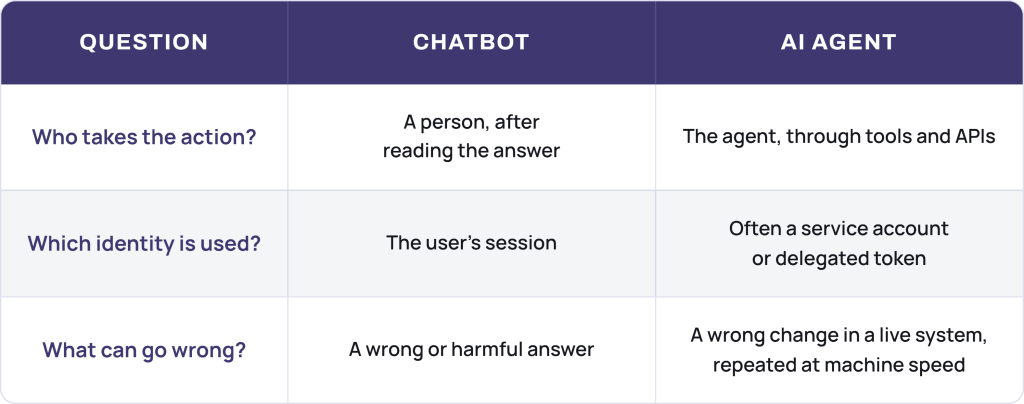
A chatbot produces text that a person reads and acts on. An agent acts itself: it calls tools, reads and writes data, and chains steps toward a goal. That changes three things for IT.
Gartner predicted in June 2025 that over 40% of agentic AI projects will be canceled by the end of 2027, citing rising costs, unclear business value, and inadequate risk controls, according to SD Times. Good AI agent governance is how a project avoids that third reason.
Control 1: An agent register
You cannot govern agents you cannot see. Keep one register for every agent in production or pilot, whether it was built in-house, configured in a SaaS platform, or added by a business team. Microsoft’s guidance on governing AI agents describes this as a governance and security baseline every agent must meet before it is allowed to operate.
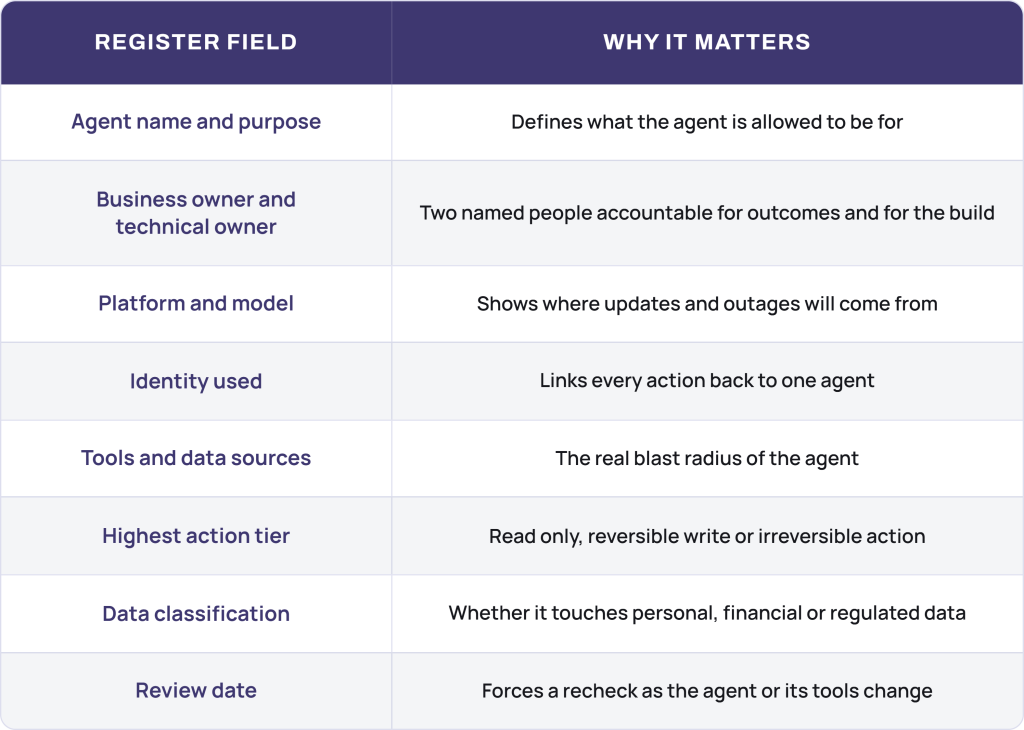
Make registration a condition of production access. An agent that is not in the register does not get credentials.
Control 2: Agent identity and least-privilege permissions
Give every agent its own identity. Shared service accounts make it impossible to tell which agent did what, and personal user tokens give agents everything that person can do.
- Issue a separate identity per agent, managed in your identity provider like any other non-human identity.
- Grant only the scopes the agent needs for its tasks: read access to one CRM object, not admin rights to the CRM.
- Prefer short-lived, scoped tokens over long-lived API keys, and rotate what cannot be short-lived.
- When an agent acts for a user, use delegated access so it cannot exceed that user’s own permissions.
- For agents that connect to tools through the Model Context Protocol (MCP), use the protocol’s OAuth-based authorization rather than embedding static keys in configuration.
- Review agent permissions on the same cycle as privileged human access.
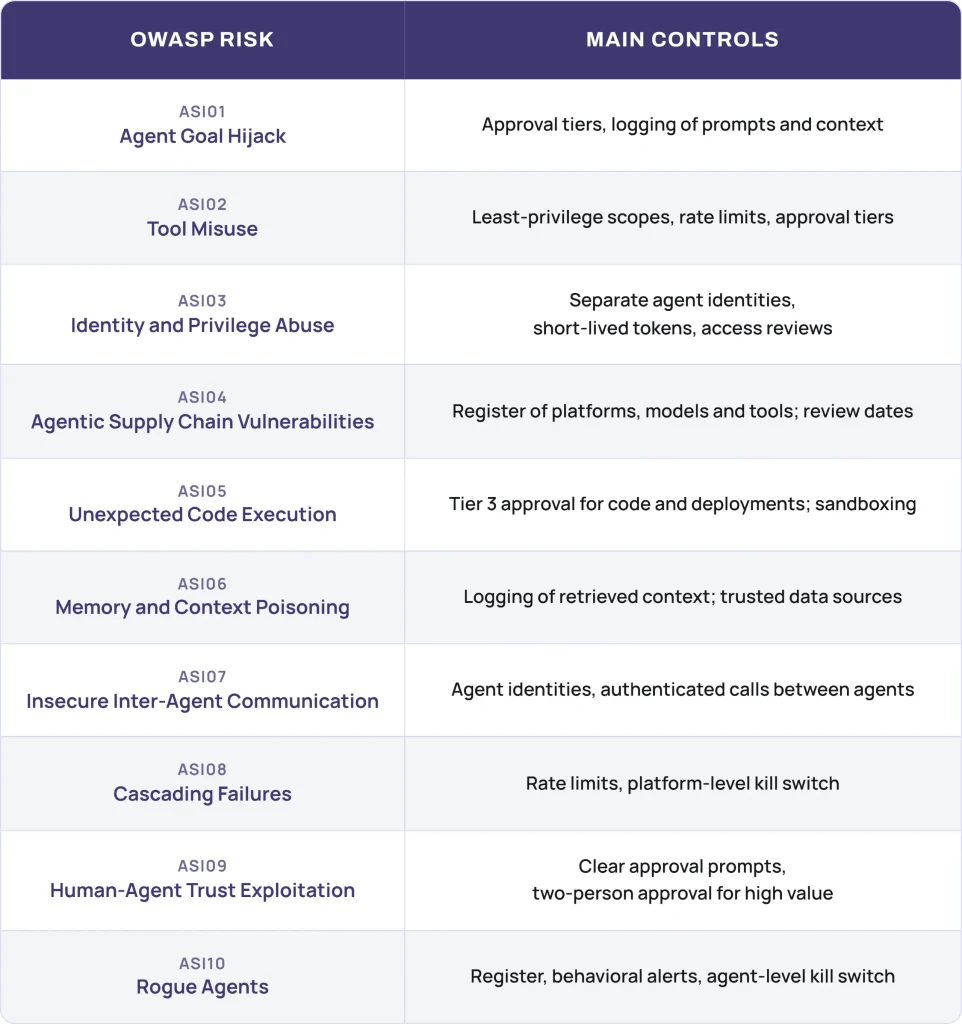
OWASP lists identity and privilege abuse as one of the top ten agentic risks. Most incidents in this category trace back to an agent holding more access than its job needs.
Control 3: Action approval tiers
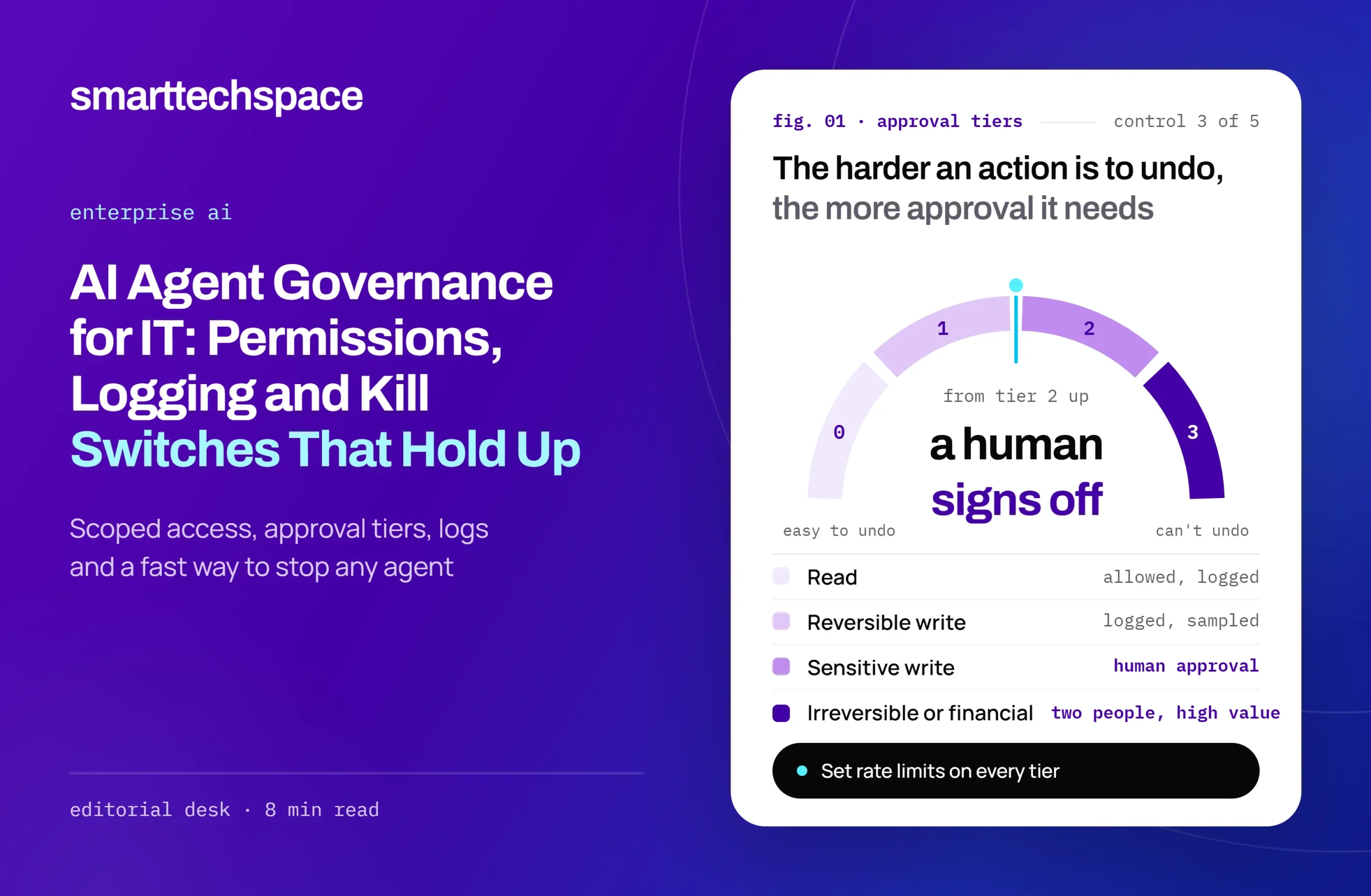
Not every action needs a person to approve it. Decide by how easily the action can be undone and how much harm a mistake would cause.
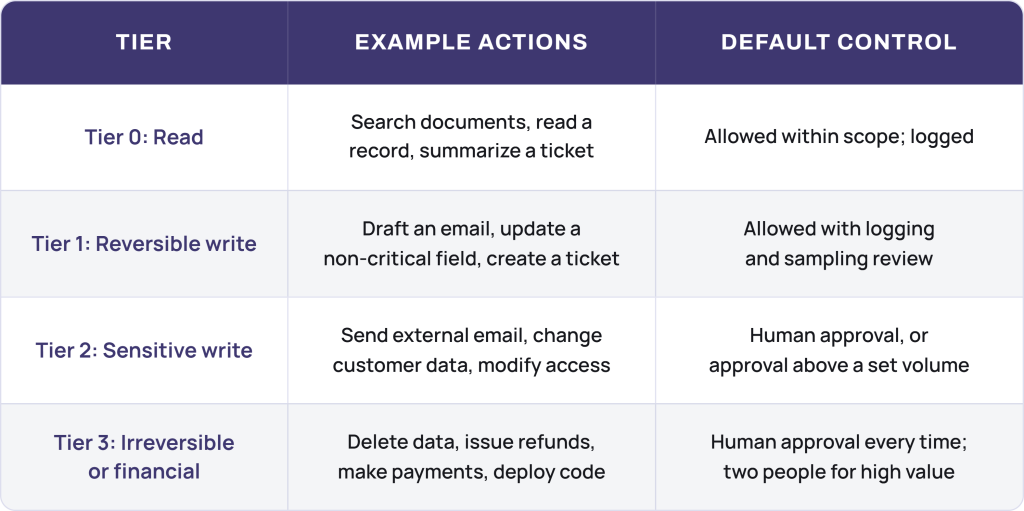
Set rate limits on every tier. An agent that can update one record per minute is a nuisance if it goes wrong. One that can update ten thousand per minute is an incident.
Control 4: Logging and observability
When an agent does something unexpected, the first question is always, “What did it see, what did it decide, and what did it do?” Your logs must answer all three.
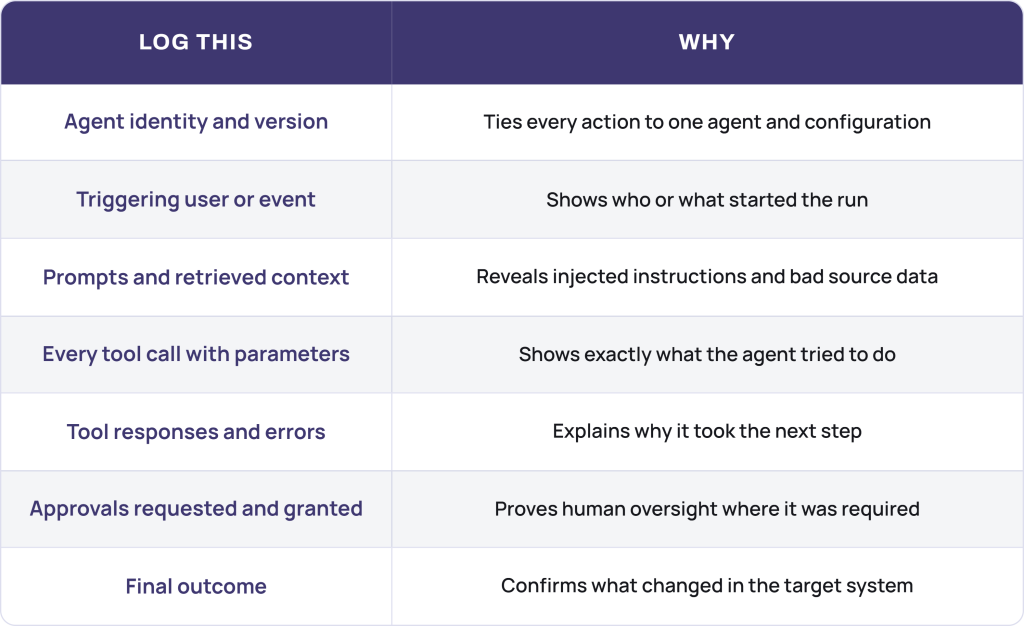
Send agent logs to the same security monitoring stack as your other systems, with retention set by your data policies. Mask personal data in logs where you can. Then build alerts on behavior, not just errors: unusual tool sequences, sudden volume spikes, access outside working patterns, and repeated approval requests.
Control 5: Kill switches at three levels
Every agent needs a fast, tested way to stop. Plan for three levels, because the right response depends on how far a problem has spread.
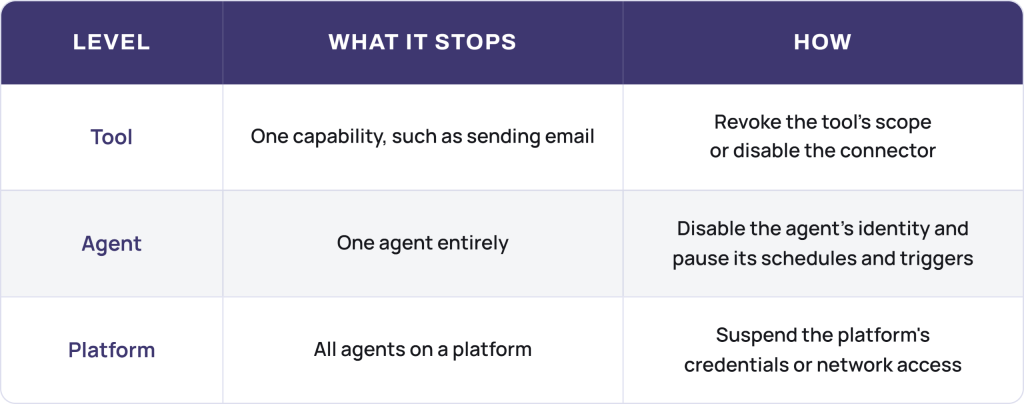
Test each level at least once a quarter, and record how long it took. A kill switch that has never been used is a plan, not a control. Also decide in advance who is allowed to pull each one without waiting for approval.
Mapping the controls to OWASP agentic risks
The OWASP Top 10 for Agentic Applications, published in December 2025, gives security teams a shared list of risks. This is how the five controls cover it.
A 90-day AI agent governance rollout
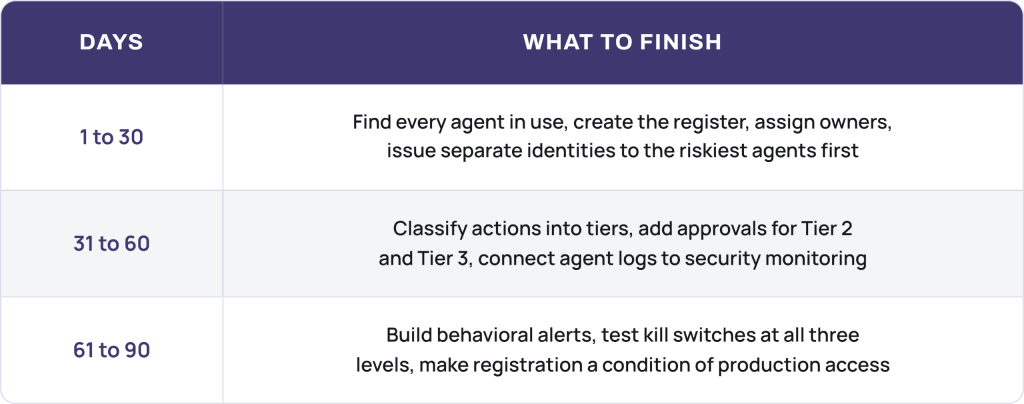
Map the result to your wider frameworks once the controls exist. The NIST AI Risk Management Framework and ISO/IEC 42001 give the management system around these controls, and the EU AI Act may add obligations depending on what your agents do. For the executive policy layer, TechsterHub’s AI governance framework covers roles, policies, and oversight.
If you are still choosing where to build agents, our guide to enterprise AI agent platforms compares how each one handles identity, logging, and approvals. For design patterns, see our AI workflow agents guide.
FAQs:
What is AI agent governance?
It is the set of controls that decide what an AI agent can access, which actions it can take alone, who approves the rest, how its activity is logged, and how it is stopped.
How is AI agent governance different from AI governance?
AI governance covers policy and oversight for all AI. Agent governance adds technical controls for systems that take actions, such as identities, permissions, approvals, and kill switches.
Should AI agents have their own identities?
Yes. A separate identity per agent lets you scope permissions, trace every action, and switch one agent off without affecting others.
Which agent actions need human approval?
Actions that are hard to reverse or high impact, such as sending external emails, changing customer data, making payments, or deploying code.
What should be logged for AI agents?
The agent’s identity and version, the trigger, prompts and retrieved context, every tool call and response, approvals, and the final outcome.
What is an AI agent kill switch?
A tested way to stop an agent quickly, at the level of one tool, one agent or a whole platform.